Tag Archives: Dyslexia

How Percy Jackson Made Dyslexia Cool

To celebrate the release of The Mark of Athena, Rick Riordan’s latest book in his Heroes of Olympus series, I created this short video to give you a fun summary of the Percy Jackson and the Olympians series and the first books in his latest series.

I’m looking forward to listening to the audio version, and if you’re dyslexic, as part of my video, I also talk about how you can enjoy these books too, whether your mom reads them to you or whether Learning Ally reads them to you. 🙂 You can also listen to the audio CDs from your public library.

Percy Jackson is a dyslexic who has extraordinary powers, and in addition to being a demigod, he’s a really nice guy. He made me feel better about myself, because he’s a dyslexic who is also a hero!

One of the greatest Percy Jackson moments for me was when I told a friend recently that “I have dyslexia”, and she said, “Oh, like Percy Jackson!” Thanks to Percy Jackson and Rick Riordian, dyslexia became something really cool. Instead of the guy who had problems reading, you were a demigod. 🙂

Mark of Athena Book release party at BookPeople

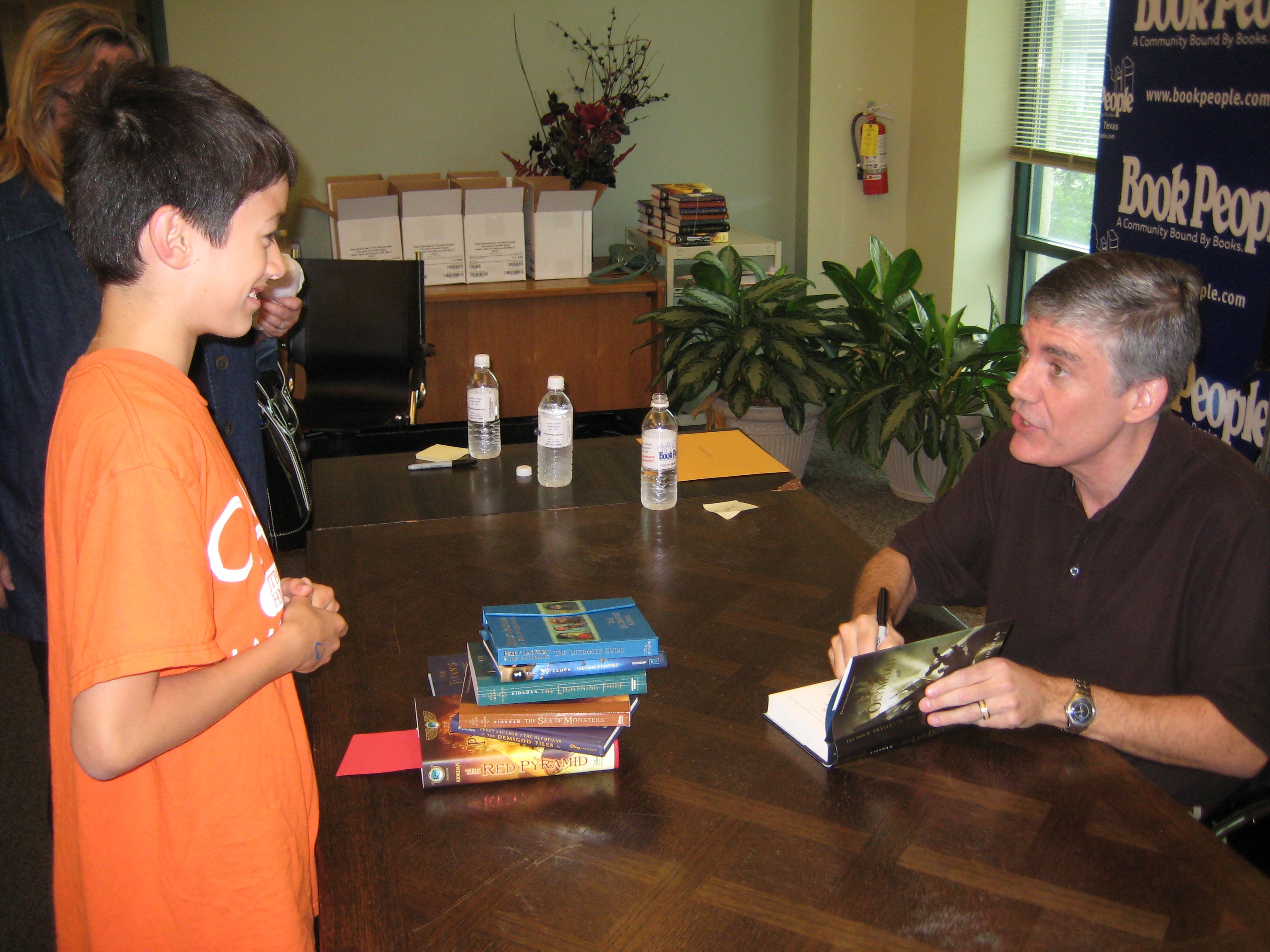
Young Commander Ben and Mr. Rick Riordan at The Red Pyramid book signing at BookPeople

If you’re in Austin, Texas, be sure to stop by BookPeople on October 8, to be part of the parking lot celebration of Rick Riordan’s latest book, The Mark of Athena. You can enjoy the fun games and activities and pick up a signed copy of the book.

I’ve been to past book releases at Book People, and they’re a lot of fun! In the picture above, I picked up a Camp Half-Blood t-shirt at the The Red Pyramid book signing.

And during the release party of The Lost Hero, Mr. Riordan said that he would like to also write a book series with Norse Mythology, but at the time, he was busy writing his Greek/Roman and Egyptian series. If he starts writing the Norse series, it would be really cool to see how Odin, Thor, and Loki are portrayed. Will they be similar to what we’re used to, or will they be really different?

It’ll be fun to find out!

Update: Watch a video of the Mark of Athena event

Your friend,
Ben

1 Comment

Filed under Audio CDs, BookPeople, Camp Half-Blood, Demigod, Dyslexia, Dyslexic, Greek, Heroes of Olympus, Learning Ally, Library, Mythology, Norse, Percy Jackson, Percy Jackson and the Olympians, Reading, Recording for the Blind & Dyslexic, Rick Riordan, Roman, The Lightning Thief, The Lost Hero, The Mark of Athena, The Red Pyramid

What Steven Spielberg, Movie Making, Dyslexia…and Me…Have in Common

Director Steven Spielberg
Photo Credit: Wikipedia and the Department of Defense

Steven Spielberg is famous for making movies. Most people know that. But there may be something that you don’t know about him. Steven Spielberg has dyslexia.

As a movie maker myself – OK a young, hopefully up and coming movie maker 😉 – I was so intrigued when I learned this new bit of information. Besides great filming making ability ;-), Steven Spielberg and I both have something else in common…dyslexia! 😉

Here I am at the premiere of my “Native Plant Avengers” video at the Lights Camera Help Focus on Good Film Festival.

A Rough Beginning

It turns out that Mr. Spielberg was bullied in school for being about two years behind his classmates in reading ability. Boy, can I relate. It took me over two years just to learn the alphabet! As I have shared in an earlier post, I could speak well for my age and had a great vocabulary, but I could not read at all when I was six, seven and not even by eight years old.

By the time I was about nine, all the other kids in the neighborhood were reading well…but not me. I could read a few words but not many. My skill was more like that of someone in kindergarten, at best. And I had already been in reading therapy for four years – what felt like a life time (at least to a kid). It wasn’t until about the age of 10 that I could start to recognize words.

It All Started in Kindergarten…

When I was six I started kindergarten as the smart kid but within a month I was the kid who couldn’t learn how to read, the kid who was no longer smart, the kid with a disability. How could this be?  Inside, I knew I was smart.  I was often the brunt of jokes but what hurt me the most was when well meaning teachers and other adults would whisper about me to one and other, “He has a disability…” Oh how bad that made me feel. They may have thought I couldn’t hear, but I heard.

I heard a lot of whispers. It was as though many adults had put me in a box that I could never get out of. They took away my hope and made me feel like some kind of weirdo. There is so much emphasis put on learning how to read as the road to success…that if you can’t read, people “write” you off.  In a kinder world it would be better not to label anyone disabled but instead to focus on what they can do – what they are good at. Everyone – no matter what – has something to offer to make society better.

High Block Protects the Face Very Well

I felt so alone and so sad when I was at school. I was only six and I already hated school. I was bullied so much on the playground and even got knocked out once.  It must have been quite a scene because I remember the school had to call my Mom who rushed right over. I was fine, but after that incident my Mom enrolled my in Taekwondo so I could learn how to defend my self.

I’ve never been a fighter but Taekwondo gave me so much confidence. Confidence in myself and the discovery that I was good at a sport! If it wasn’t for my parents, I don’t know what would have happened to me…in more ways than one!  I’m so grateful to my Mom, and my Dad too, who always stuck up for me and told me that I could do anything I wanted.

It’s Not A Disability!

My Mom also explained to me that I just learned differently. A learning difference.  That was a lot better than a disability.  My Mom never said I had a disability. I can’t begin to tell you how much that meant to me. It changed my life. When she said that I learned differently, I was relieved.  Don’t get me wrong, at the time different wasn’t great but it was better.  No six year old wants to be different, but at least it restored my hope.  Different didn’t mean I couldn’t succeed.   It just freed me to learn at my own pace…my own ability (not dis-ability). It’s really the time I can pinpoint to when I developed my optimistic spirit. I can’t believe how lucky I’ve been to have my Mom in my corner. She is really the right mom for me! 🙂

A Bright Future

As I find out more about famous people who have dyslexia – especially creative movie makers like Steven Spielberg – it gives me a great deal of hope about my future.  Along with a certified academic language therapist, numerous other tutors, and my Mom, who has homeschooled me for the past seven and a half years, I can finally read.  Yes, slowly – and I still have to sound out a lot of words. But that’s OK because I can finally do something that most kids have been able to do all along…read. Yes, maybe it was easy for them to get there but I caught up over time. Well, sort of caught up but I can read well enough to “get around town” as my Mom says. 😉 And now I don’t feel so different.  I feel special.  Special because I’m me.  I may have dyslexia but in a way I think it has also given me a very creative mind.

Indiana Jones – A Dyslexic’s Creation

And speaking of creative minds, Steven Spielberg definitely has one too!  One of my favorite movies is Indiana Jones and the Raiders of the Lost Ark.  Indian Jones, his hat, and his whip are one of the coolest teams in history!  I look forward to the day when I can make action movies like that. 🙂  Hmmm…Commander Ben and the Raiders of the Lost Plants! 😉

It took a lot of hard work (and some rough patches here and there) to get where I am now. But along the way I also discovered all the other wonderful ways in which my brain works!  As I leave homeschooling behind, I can’t wait to start high school next year.  I have a lot to bring to my new school. I’m smart, creative, athletic, outgoing, friendly…and an all around nice guy…and I’m not disabled…I just learn differently! 😉

Ben 🙂 Age 14

The Future “Sounds” Bright

So if you have dyslexia, don’t worry.  There are bumps along the way but it does get easier.  We dyslexics have something special! 🙂  And remember, technology improves everyday putting us on a more even playing field with other kids.  Just five years ago, it would have been hard for me to do this blog because voice-to-text technology was no where near as good as it is today.  Who knows what amazing technologies await us in the future!

Your friend,
Ben

P.S. October is National Dyslexia Awareness Month! Happy October!

Leave a comment

Filed under Bullied, Certified Academic Language Therapist, Certified Academic Language Therapist, disability, Dyslexia, Indiana Jones, Learning difference, National Dyslexia Awareness Month, Raiders of the Lost Ark, Reading, Steven Spielberg, Steven Spielberg, Taekwondo

If You Have Dyslexia, Make The iPad or the iPhone Speak

“Speak Selection” Function on the iPad

Many thanks to my fantastic readers for the outpouring of support about my dyslexia posts!

Over the last few days, I’ve received some emails with technology questions so I wanted to take the chance to answer them here on my blog.

Today, I want to share a short tutorial about how to make the iPad or the iPhone “speak”. This function is called “Speak Selection” and is a great text reader function for anyone who has dyslexia.

“Speak Selection” can be easily accessed by clicking on the “Settings” App icon.

The “Settings” App Icon on the iPad Screen

For me, as someone who does have dyslexia, being able to have a good text reader is essential.  I use a text reader tool on my laptop (I’ll talk about that another day), the iPad and the iPhone.

It really is as easy as 1, 2, 3.

Turn on Speak Selection for the iPad

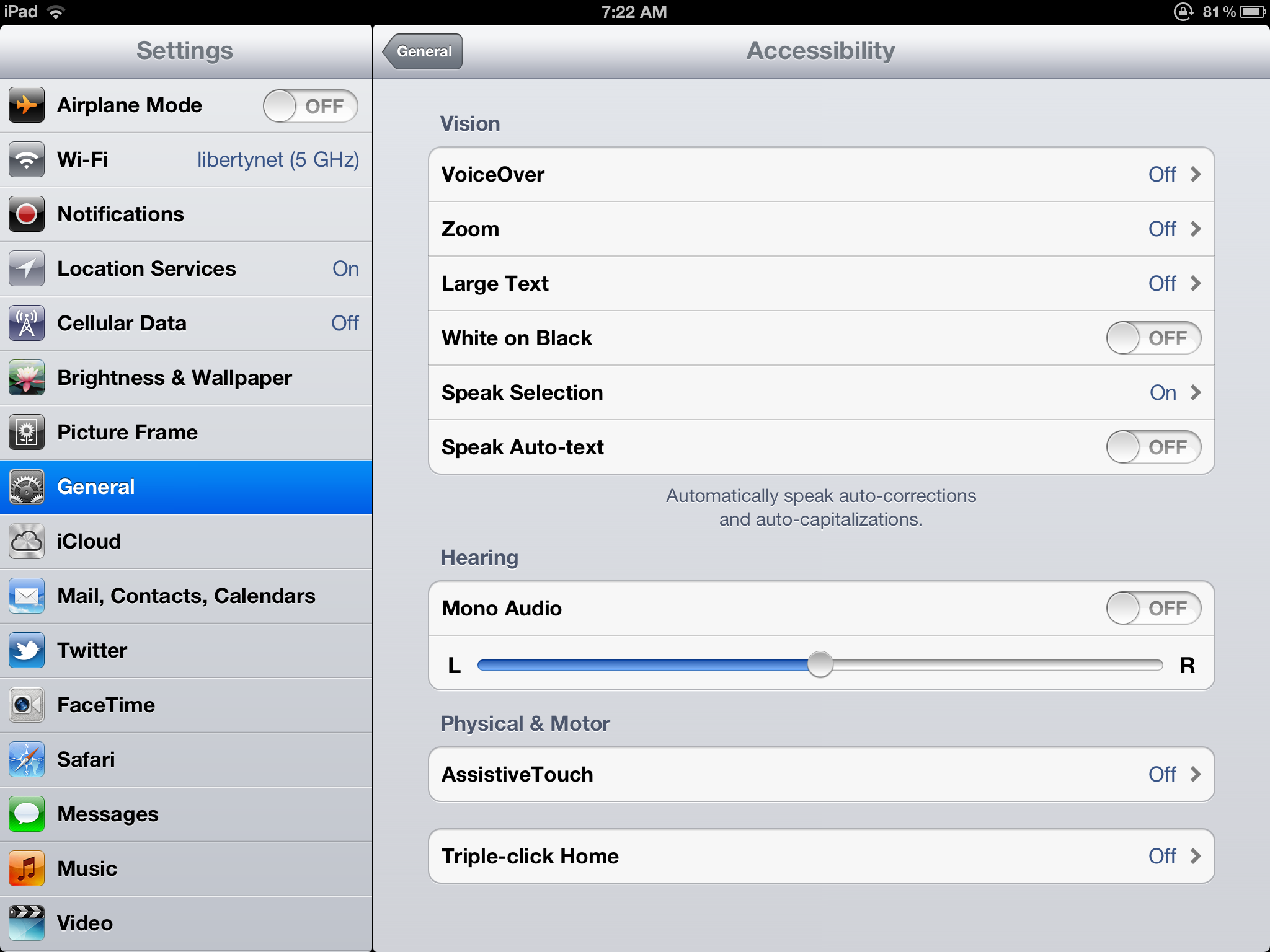
First, tap on the Accessibility bar.

Tap on the “Accessibility” Bar within “Settings” on the iPad

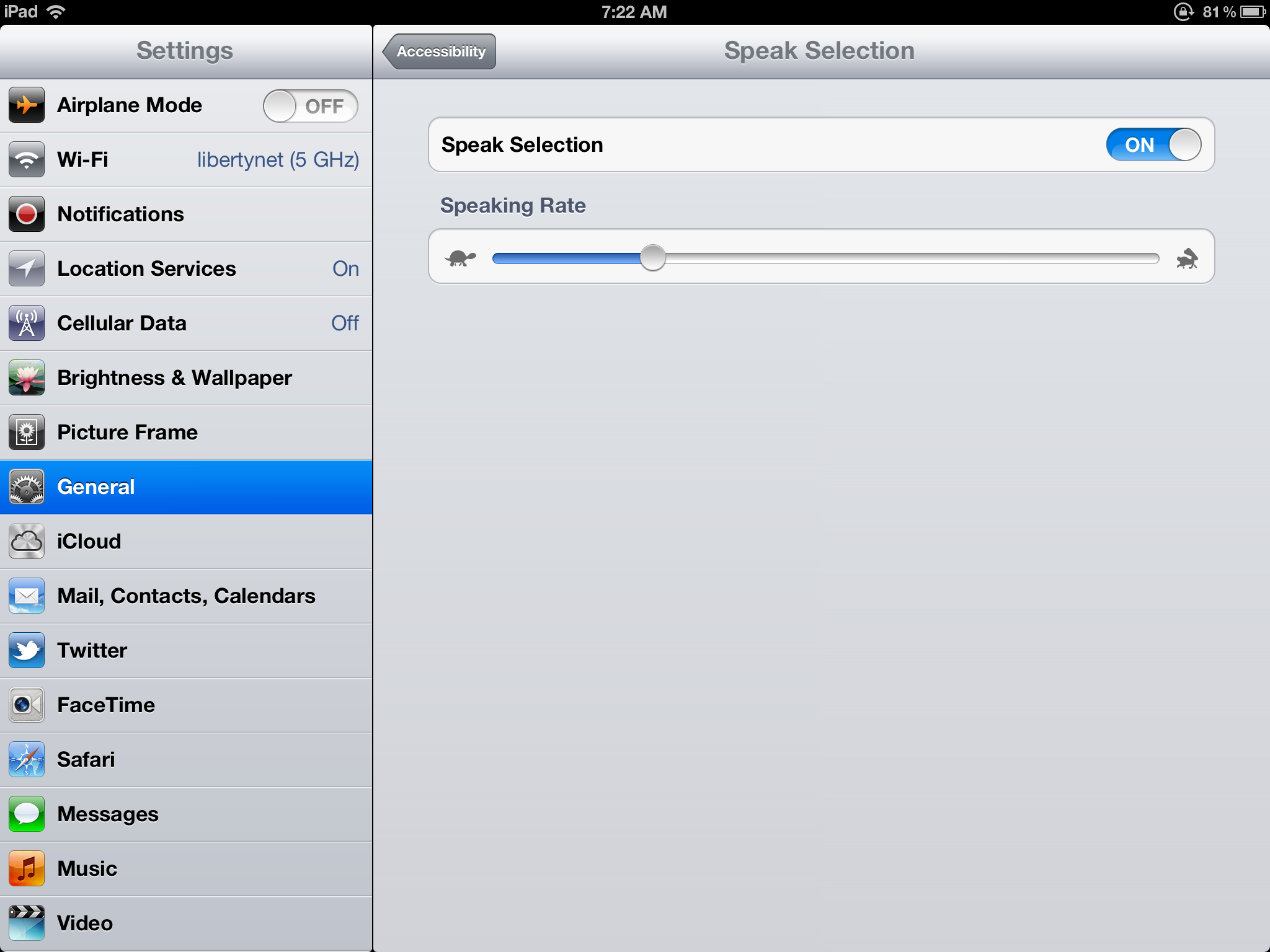
Second, tap on the “Speak Selection” bar.

Tap on the “Speech Selection” Bar on the iPad Screen

Third, after tapping on the “Speak Selection” bar, tap on the “OFF” icon to turn Speak Selection “ON”. Next, adjust the “Speaking Rate” at which you want the voice to speak – slow is to the left (the turtle icon) and fast is to the right (the hare icon).

I like to have my iPad read a bit on the faster side.  I can’t really say why, except for the fact that my brain seems to be able to process it easily.  Maybe it’s  just had lots of practice processing the spoken word from listening to so many wonderful books all these years.   Thanks Learning Ally!

Tap on the “OFF” icon to turn Speak Selection “ON”. Next, adjust the “Speaking Rate” on the iPad screen.

And now you’re done.  You’re iPad should be able to speak to you anytime you want. 😉

When you want to have your iPad speak to you, just highlight the text you want to read and when the screen instruction appears to “copy” or “speak” just tap on “speak”. That’s it!

Just highlight the text you want to read and then tap on “Speak”.

Turn on Speak Selection for the iPhone

When it comes to activating the “Speak Selection” function on the iPhone, it’s as equally easy as it is on the iPad.  Again, it’s just 1, 2, 3.

First, tap on the “Settings” icon app on the iPhone screen and then tap on the “Accessibility” bar within the Settings app.

Tap on the “Accessibility” bar on the iPhone screen within the “Settings” App.

Second, tap on the “Speak Selection” bar.

Tap on the “Speak Selection” Bar on the iPhone screen.

Third, after tapping on the “Speak Selection” bar, tap on the “OFF” icon to turn Speak Selection “ON”. Next, adjust the “Speaking Rate” at which you want the voice to speak.  As with the iPad, it’s the same on the iPhone – slow is to the left (the turtle icon) and fast is to the right (the hare icon).

Tap on OFF Button to turn “Speak Selection” ON, then adjust the reading speed.

Highlight the text you want to read on the iPhone, then tap on “Speak”.

And 0nce again, now you’re done.  You’re iPhone will speak to you anytime you want. 😉  All you have to do is highlight the text you want to read and when the screen instruction appears to “copy” or “speak” just tap on “speak”. You’re all set!

Be sure to visit the Dyslexia page of my blog to read my other posts including:

Your friend,
Ben

4 Comments

Filed under Dyslexia, iPad, iPad Speak Selection, iPad Tutorials, iPhone Speak Selection

How To Make Paper Journals Dyslexic Friendly

My Notebook, Pen, and iPad

It may seem funny to talk about technology in one breath and then mention pen and paper in the other, but they really can work together. For most everything I do, I use some form of technology – my Victor Reader Stream, a laptop, an iPad or an iPhone – but sometimes , well almost daily actually, I still enjoy writing something down into my old-fashioned journal.

My journal is a small leather three-ring binder with lined paper which is actually three generations old. I found it tucked away in my dresser draw in my room where my Mom had saved it for me. She used it as a kid and her Mom used it before her.  I think that fact that it was old and looked different than other notebooks was part of it’s appeal.  Even though I am a 21st century kid, I like old-fashioned things.

Handwriting and Spelling – Always a Challenge

Mind you, this was not something I took to immediately. Having dyslexia, compounded with dysgraphia, has always made handwriting and spelling very challenging for me. But I loved the idea of having a private journal where I could scribble (literally!) my secret notes. I think it started around the time I read (thank you Learning Ally!) the first book in The 39 Clues Series.

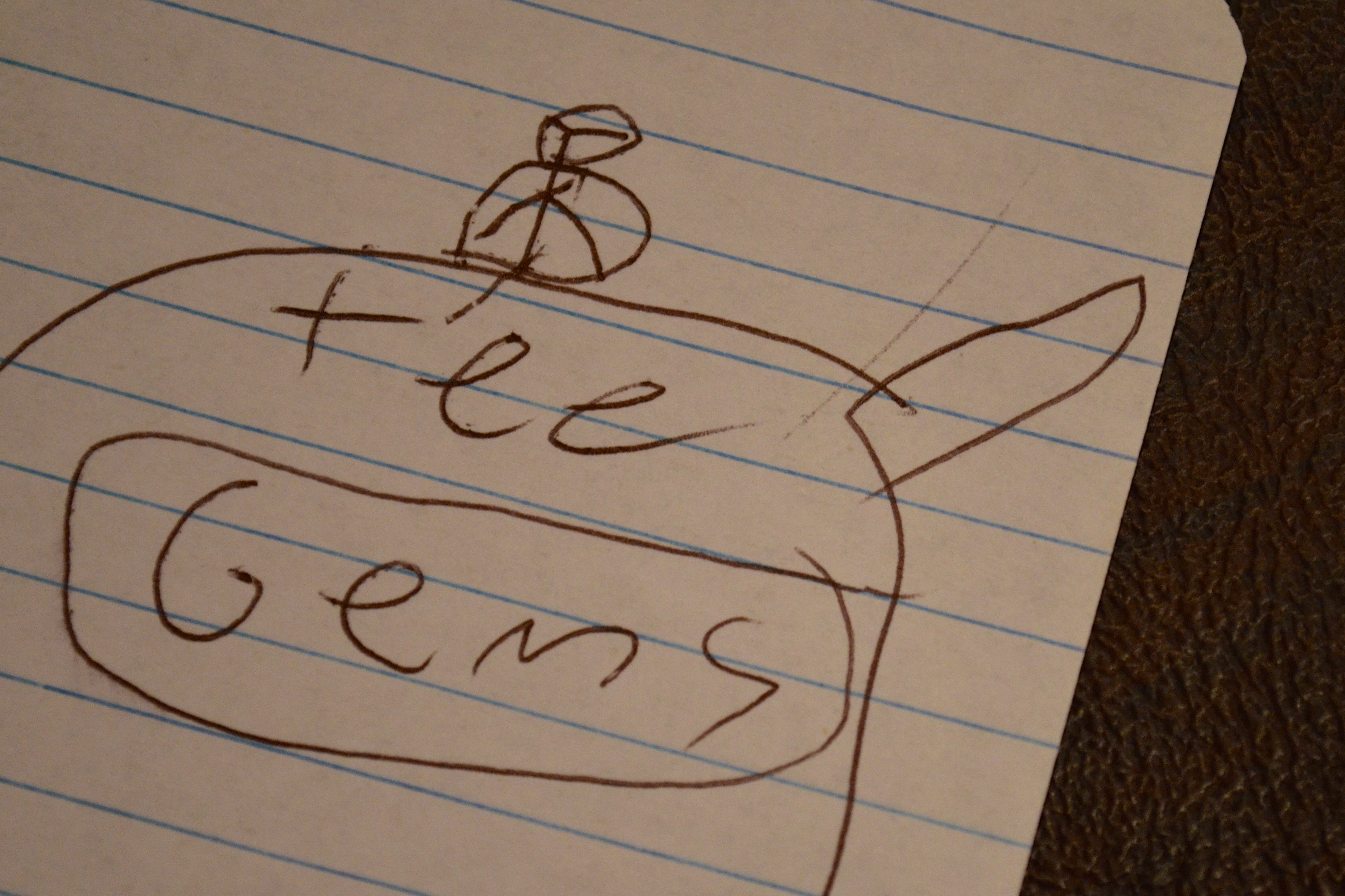
I was jotting down “clues” in my journal, ripping them out, and hiding them around the house. (My parents are still finding them and that was a few years ago!)  They were far from perfect, often misspelled notes, usually with a hand sketched picture for clarification, but suddenly writing was fun and not a chore.

My early attempts at writing – a “Clue” from The 39 Clues.

How Technology Can Help

But where my writing style differs from most kids, is that I use a combination of paper, pen…and technology to jot down my thoughts.  If I’m at home, I’ll prop the iPad in front of me as I write in my journal.  I start to write, and as I think of a word that I don’t know how to spell, I use the iPad Dictation Mode to record it.  The word will pop up on the screen and then I’ll use the text reader to read it back to me to make sure it’s the right word that I want to use.  If it is, then I copy it into my journal.
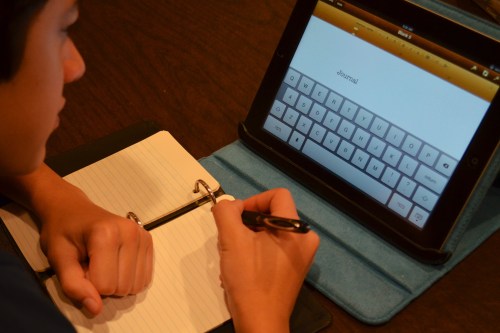
Here I am getting ready to write in my journal with the iPad ready to help.

The reason that I have the iPad read the word back to me is because  – although it’s a great tool – it’s not perfect.  Sometimes I might dictate a word, but the iPad hears it slightly differently and puts a different word on the screen…but I can’t always read it well enough to tell the difference.  Having the iPad read it back to me lets me know that the iPad understood me correctly and I am copying the right word that I want to use.

Write or Right?  Which One Is it?  How “ing” came to the rescue.

Oh!  But this just made me think of something important.  What about words that sound the same but are spelled differently such as “write” and “right”! How does the iPad know what to “write” so that I use the “right” word.  Well, it doesn’t.  But that’s OK.  Let me explain.

I may not know that the spelling of a same sounding word with different meanings might have different spellings, but I make the educated guess that it does, so I usually add “ing” to the word I dictate.  If I say “writing”, the iPad will usually not type out “righting”, (yes, “righting” is a word but it is less common, so the iPad will usually go with the more common word which is usually the word I’m looking for), so I know I have the “right” word to “write”.

The same is true with words like pear and pare.  I would have no idea how to spell either of these, and I wouldn’t even really know that they are spelled differently, but if I use my trick and add “ing” to the word, the iPad will type paring not pearing.  So then I know that the word on my iPad screen means “a pair” and the other is a fruit.  Clever, huh? 😉

But It’s All Worth It

Having to use the iPad to help me write in my journal may be an extra step compared to what other kids might have to do, but I actually find it fun because it gives me the freedom to be able to write down my own thoughts, in my own hand…and without having to call out, “Mom, how do you spell…”

And it’s a much more fun way to practice handwriting than writing the same letter over and over again.  And speaking of practice, keeping my journal has actually helped to improve my handwriting.

And one other thing I would like to share that you might be wondering about.  Why do I use a pen instead of pencil?  Wouldn’t it be easier to erase, if I used a pencil?  Well, that’s true but I like a pen for two reasons.

One, a pen is more scientific.  Scientist always write in pen in their scientific notebooks for the very reason that it can’t be erased.

And second, I simply like the weight of a pen – preferably a substantial, thick, heavy weighted pen as opposed to a light weight pencil.  It just makes writing easier for me.  I thought it was just me, but I learned that people with dyslexia often do finding writing easier when their writing instrument of choice is weighted.

So if you struggle with handwriting like me, why not try writing in a journal.  You might find it fun.  And your handwriting might improve as well.  I love the fact that I can neatly (relatively!) write my name and phone number on a piece of paper and hand it to a girl proudly! 🙂

Be sure to visit the Dyslexia page of my blog to read my other posts including:

Your friend,
Ben

14 Comments

Filed under Dysgraphia, Dyslexia, Handwriting, Learning Ally, Victor Reader Stream, Weighted Pen

Vote for my SXSWedu Presentation: What Invasive Species Taught Me About Dyslexia

I submitted a presentation proposal for the SXSWedu 2013 conference, that will be held from March 4-7 in Austin, Texas. I’ll talk about how I use technology to work with my dyslexia and use my strengths to help others and our native ecosystem at the same time.

Since SXSWedu takes into account public voting in their PanelPicker tool to determine what presentations to choose for their conference, I hope that you’ll vote for my presentation! 🙂 Voting ends on October 5.

Presentation Abstract

The Giant Reed and Elephant Ear. It was a lot easier to take down these invasive species than to read about them. I longed to battle these exotic plants in nature than confront them on the printed page, where they had the advantage. Rather than give them the upper leaf, I embraced technology to discover more about my opponents and learn how to defeat them.

Join me as I share my journey as Commander Ben, The Invasive Hunter, and describe the tools and techniques I use to protect my native ecosystem and tackle my dyslexia.

It’s been a hard path, but I’ve learned to work with my dyslexia and use my strengths and unique teaching style to help others and our native ecosystem at the same time. I’ll share with you new ways to help your dyslexic students, so they can become Invasive Hunters both on and off the printed page!

Thanks a bunch! 🙂

Be sure to visit the Dyslexia page of my blog to read my posts about dyslexia including:

Your friend,
Ben
2 Comments

Filed under Dyslexia, Invasive Hunter, Invasive Species, PanelPicker, SXSWedu, What Invasive Species Taught Me About Dyslexia